
Download 1LimX – Secure Offline Data Manager for Windows, Mac, Android & iOS
1LimX is a powerful, privacy-first data manager designed for users who value security and control over their digital information. Unlike cloud-dependent tools, 1LimX operates entirely offline, ensuring your sensitive data—be it passwords, notes, files, or credentials—never leaves your device. With advanced encryption using the ChaCha20-Poly1305 algorithm and 256-bit key strength, it meets the same security standards trusted by Google and other industry leaders.
Whether you're managing personal notes, securing financial records, or protecting two-factor authentication codes, 1LimX provides a reliable, user-friendly solution. The app supports cross-platform synchronization across Windows, Mac, Android, and iOS, allowing seamless access to your encrypted vault wherever you go. With features like biometric login, auto backup, password generator, and custom file encryption, 1LimX stands out as one of the most secure and versatile data management tools available today.
Download 1LimX now to take full control of your digital privacy with a free, secure, and powerful tool.
Secure, Offline Data Management with Military-Grade Encryption
When it comes to managing sensitive digital data, trust and security are non-negotiable. 1LimX delivers on both fronts by offering a fully offline data management experience. Unlike cloud-based password managers that store your data on remote servers, 1LimX keeps everything encrypted locally on your device.
This means your passwords, notes, images, and files are never transmitted over the internet—ensuring maximum privacy and protection from potential breaches. The software uses the ChaCha20-Poly1305 encryption algorithm, a modern and highly secure cipher recommended by industry experts, including Google. This encryption method is resistant to side-channel attacks and is faster than traditional AES in many scenarios, making it ideal for real-time data access without compromising performance.
At the core of 1LimX’s security model is the master password and master key system. Users create a strong master password, which is combined with a user-defined master key (a secret string of characters) to generate the encryption key. This dual-layer approach ensures that even if someone gains access to your master password, they cannot decrypt your data without the master key.
Biometric authentication—such as fingerprint or facial recognition—is also supported on compatible devices, adding an extra layer of convenience and security. All data processing, including encryption and decryption, happens entirely on your device, with no external dependencies. This offline nature eliminates the risk of data leaks during sync or transmission, making 1LimX an ideal choice for professionals, remote workers, and privacy-conscious individuals.
Moreover, 1LimX supports 256-bit encryption, a standard used by governments and financial institutions worldwide. This level of security ensures that even with advanced computing power, brute-force attacks are practically impossible. Whether you're storing personal notes, sensitive work documents, or two-factor authentication tokens, your data remains protected with enterprise-grade safeguards. The combination of offline operation, robust encryption, and user-controlled keys gives you complete ownership and peace of mind. With 1LimX, you’re not just using a tool—you’re adopting a security-first mindset for your digital life.
Powerful Features for Every User: From Basics to Advanced Security
1LimX isn’t just secure—it’s packed with smart, practical features designed to enhance both usability and security. The app supports a wide range of data types, including text notes, passwords, files, images, dates, and times, all of which can be encrypted and stored in a single vault. This versatility makes it more than just a password manager; it’s a complete personal data vault. For users who need to generate strong, unique passwords, 1LimX includes a built-in password generator that creates random, complex strings based on customizable criteria—perfect for avoiding weak or reused passwords.
One standout feature is the ability to encrypt custom files and text directly within the app. You can drag and drop any file—be it a PDF, image, or document—into 1LimX, and it will be encrypted using your master key and password. This is particularly useful for safeguarding sensitive documents like contracts, tax records, or personal photos. The app also supports autofill functionality on mobile devices, making login processes faster and more secure across websites and apps. With auto backup enabled, your encrypted vault is automatically saved to your device or a secure cloud (optional), so you never lose access to your data due to device failure.
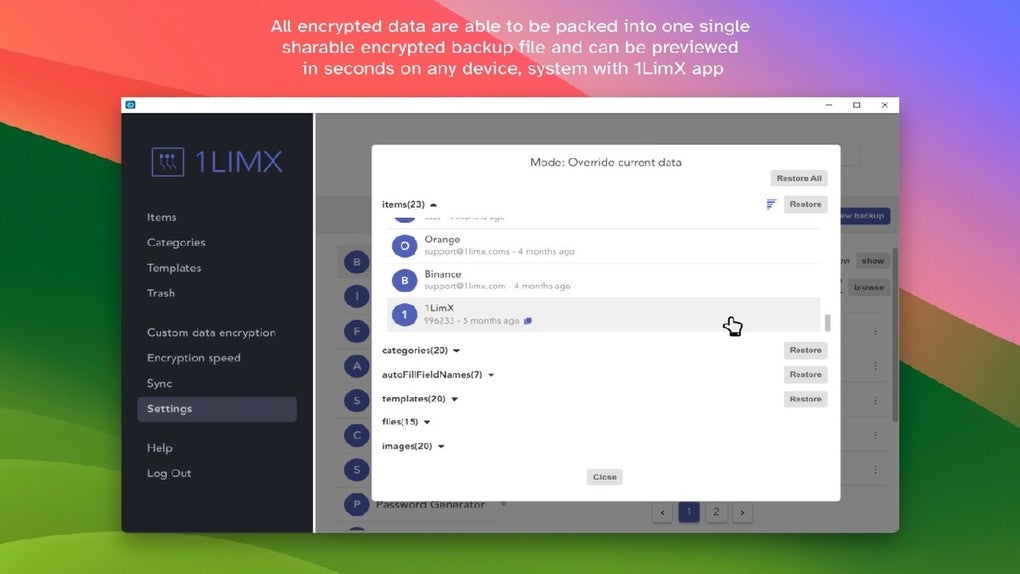
Another powerful feature is the ability to create a single sharable encrypted backup file. This allows you to transfer your entire vault between devices securely—ideal for users switching phones or setting up a new computer. The backup file is encrypted with your master password and key, so even if it’s intercepted, it remains unreadable. Additionally, 1LimX supports two-factor authentication (2FA) codes, which are stored securely and can be accessed with a single tap. Whether you’re managing personal or professional data, 1LimX’s comprehensive toolkit ensures you have everything you need in one place, all protected by military-grade encryption.
Easy Installation & Cross-Platform Compatibility for Seamless Access
Getting started with 1LimX is straightforward and requires no technical expertise. The software is available for Windows, Mac, Android, and iOS, ensuring full compatibility across your entire digital ecosystem. To install, simply visit the official website and download the appropriate version for your device.
The installation process is quick and guided, requiring minimal configuration. Once installed, you’ll be prompted to set up your master password and master key—both of which are critical for accessing your encrypted vault. It’s recommended to choose a strong, memorable master password and store your master key in a secure, offline location, such as a password-protected note or physical safe.
After setup, you can begin adding your data—whether it’s passwords, notes, or files—directly within the app. The intuitive interface makes navigation easy, with clear categories and search functionality to help you locate entries quickly. On mobile devices, the app integrates smoothly with system autofill, allowing you to log in to websites and apps with just a few taps. The auto backup feature ensures your data is regularly saved, reducing the risk of loss due to device damage or theft.
For users managing multiple devices, 1LimX offers seamless synchronization through the encrypted backup file. Simply export your vault from one device and import it on another—no internet connection required. This offline sync method preserves privacy while maintaining convenience. The app also receives regular updates to improve performance, fix bugs, and enhance security, ensuring you always have the latest version. Whether you're using a Windows laptop, MacBook, Android phone, or iPhone, 1LimX delivers consistent, reliable performance across platforms.
Pros & Cons
- Pros:
- Full offline operation ensures maximum privacy
- Uses ChaCha20-Poly1305 and 256-bit encryption for top-tier security
- Supports biometric login on compatible devices
- Encrypts files, images, text, and 2FA codes
- Auto backup and cross-device sync via encrypted file
- Free version available with essential features
- Intuitive interface for all user levels
- Cons:
- Free version has limited features (e.g., no auto backup or advanced encryption)
- Master key must be remembered—no recovery option
- No built-in cloud sync (requires manual backup)
- Learning curve for users new to encryption concepts
- Mobile autofill not available on all browsers
Frequently Asked Questions (FAQ)
-
Is 1LimX really secure?
Yes, 1LimX is designed with security as its top priority. It uses ChaCha20-Poly1305 encryption with 256-bit keys, a standard trusted by Google and other major tech companies. All data is encrypted locally on your device and never leaves your control.
-
Can I use 1LimX without an internet connection?
Absolutely. 1LimX is designed for offline use. You can create, access, and manage your encrypted data without needing an internet connection, ensuring your privacy is never compromised.
-
How do I recover my data if I forget my master password?
There is no recovery option. Your master password and master key are your only access points. If you lose them, your data cannot be recovered. This is by design to ensure maximum security.
-
Does 1LimX support two-factor authentication?
Yes, 1LimX securely stores 2FA codes and allows you to access them directly within the app, making it easy to log in to accounts with multi-factor protection.
-
Can I sync my data between devices?
Yes, you can sync data by exporting your encrypted vault as a single file and importing it on another device. This method ensures no data is shared online, preserving your privacy.
Conclusion: Take Control of Your Digital Privacy with 1LimX
1LimX is more than just a data manager—it’s a comprehensive security solution for anyone serious about protecting their digital life. With its offline-first approach, military-grade encryption, and cross-platform support, it stands out as one of the most secure and reliable tools available. Whether you’re managing passwords, storing sensitive documents, or protecting personal notes, 1LimX gives you full control and peace of mind.
While the free version offers solid functionality, upgrading to the Pro version unlocks advanced features like auto backup and enhanced encryption. For users who prioritize privacy and security over convenience, 1LimX is an excellent investment. Download 1LimX today and take the first step toward a safer, more secure digital future.







